Export & code
Your tokens don’t have to live in Figma. Export them from the web app in the format your codebase actually uses — no plugin required — or let your build and AI tools pull the latest tokens as code.
Export from the web
From the project list, open a project card’s ⋯ menu and choose Export — or, inside a project, right-click a collection in the left sidebar (or a row in the grid) and choose Export this collection. It opens a dialog with:
- Scope — the collections to export: check All collections, or pick individual ones. Opened from a collection, that collection starts checked.
- Format — one of six (below).
- Resolve references to values — turn aliases like
{Primitive/blue/500}into their final value. Platform code formats always resolve; the checkbox is on and locked for them.
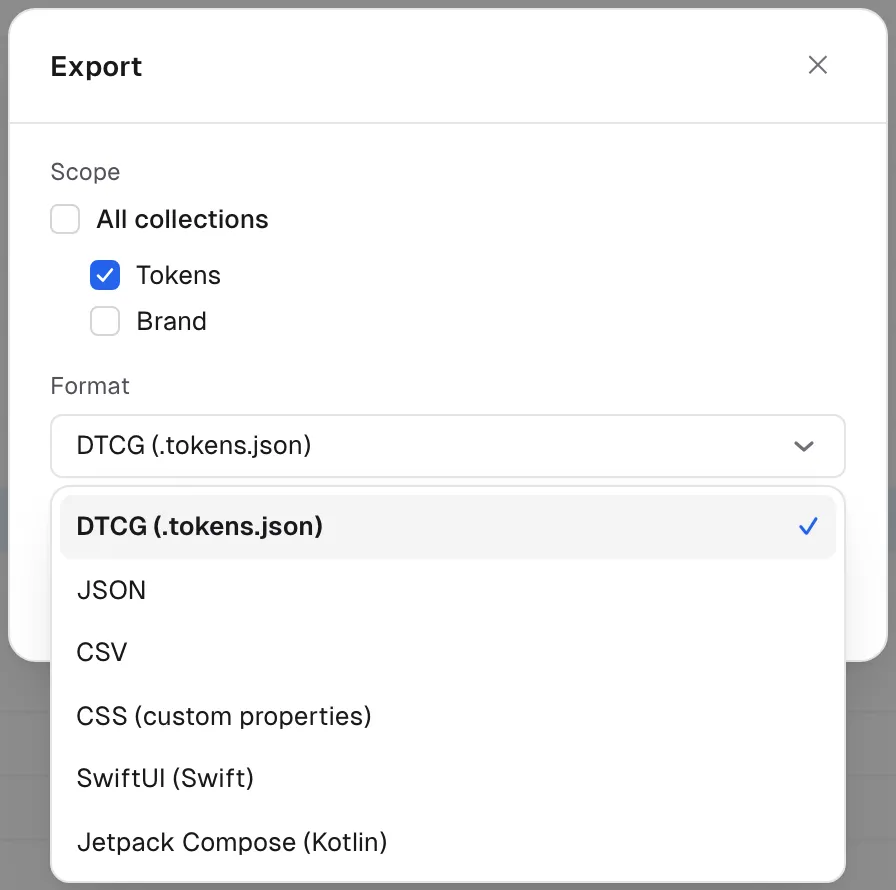
| Format | Output |
|---|---|
DTCG (.tokens.json) | W3C Design Tokens Community Group format |
| JSON | Raw variables, one entry per token |
| CSV | A spreadsheet — one row per variable, one column per mode |
| CSS | Custom properties — default mode in :root, other modes in [data-theme="…"] |
| SwiftUI | One type per collection, one static instance per mode |
| Jetpack Compose | Kotlin — a class per collection, one value per mode |
Platform code, ready to paste
Pick CSS, SwiftUI, or Jetpack Compose and you get code you can drop straight into your app. The conversion runs on the server and is deterministic — the same tokens always produce the same bytes, so it diffs cleanly and caches well. A collection with light and dark modes comes out like this:
/* CSS custom properties */
:root {
  --colors-button-background: #18181b;
  --colors-radius-md: 8px;
}
[data-theme="dark"] {
  --colors-button-background: #fafafa;
}
// SwiftUI — one instance per mode
struct ColorsTokens {
let buttonBackground: Color
let radiusMd: CGFloat
static let light = ColorsTokens(buttonBackground: Color(vjHex: 0x18181B), radiusMd: 8)
static let dark = ColorsTokens(buttonBackground: Color(vjHex: 0xFAFAFA), radiusMd: 8)
}// Jetpack Compose (Kotlin)
class ColorsTokens(val buttonBackground: Color, val radiusMd: Dp)
val ColorsTokensLight = ColorsTokens(buttonBackground = Color(0xFF18181B), radiusMd = 8.dp)
val ColorsTokensDark = ColorsTokens(buttonBackground = Color(0xFFFAFAFA), radiusMd = 8.dp)References are always resolved to final values; if one can’t be resolved it’s left as a comment, never a made-up value.
Import tokens back in
A project card’s ⋯ menu also has Import. Drop a JSON or DTCG file
and you get a preview — collection, variable and mode counts, plus any warnings — before anything
is created. Confirm, and it lands as a new collection (colors are parsed leniently: 3- or
6-digit hex, rgb(), hsl() all work). The change is recorded in history as an import.
Values it can’t represent — composite tokens such as typography or shadow, dimensions in units other than px, colors it can’t read, or values that don’t match their type — are skipped instead of guessed, and the preview shows how many and which. Importing the same file again adds another new collection.
Pull over API & MCP
For CI pipelines and AI coding tools, don’t export by hand — pull. The same platform formats are
available over the REST API with ?format=css|swift|compose, and the
@variablejar/mcp server exposes a
get_tokens tool so agents in your IDE fetch the latest tokens as code. One project API token
works for both.